Fence guide
Fence Post Spacing Guide
Plan fence post spacing using your panel width, fence material, gates, terrain, and local requirements, then calculate actual post spacing after rounding sections.
- By
- EstimatorPad Editorial Team
- Published
- October 14, 2026
- Reading time
- 4 min
Direct answer
Start with the useful estimate.
Fence post spacing is not universal. Pick spacing from the fence system, panel width, site conditions, and local requirements, then use the calculator to turn that spacing into sections and posts.

Measurement steps
How to measure
- Identify the fence type: wood panels, pickets, vinyl panels, chain link, or another system.
- Check product instructions or panel width before choosing a spacing.
- Mark corners, ends, gates, slopes, and layout changes on a sketch.
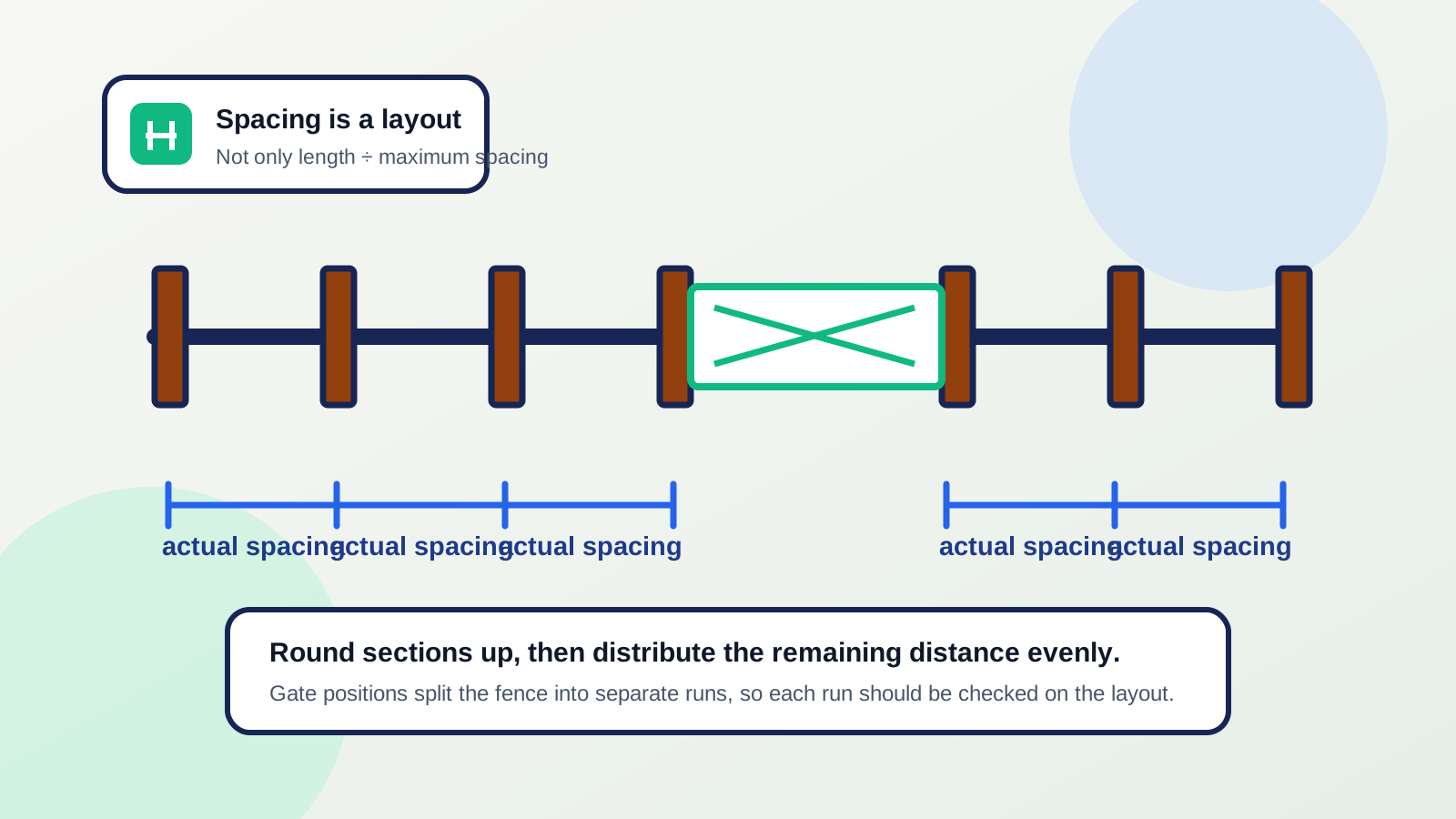
- Use a maximum spacing and let the calculator calculate the actual spacing after rounding sections.
- Confirm permits, setbacks, utilities, and local requirements before installation.
Formula explanation
The formulas to use
Sections = run_length / chosen_spacing, rounded up
Actual_spacing = run_length / sections
Posts_for_straight_run = sections + 1
Gate posts and terminal posts are counted separately
Use with this article
Fence Calculator
Enter the article's measurements and assumptions to check the rounded planning estimate.
Open calculatorProject cluster
Fencing planning pages
Open the full hub when you need the matching calculator, sibling guides, and related material estimates in one place.
Worked example
50 ft run with an 8 ft maximum spacing
- 1Run length = 50 ft.
- 2Chosen maximum spacing = 8 ft.
- 3Sections = 50 / 8 = 6.25, rounded up to 7 sections.
- 4Actual spacing = 50 / 7 = 7.14 ft.
- 5Straight-run posts = 7 + 1 = 8 posts before gates.
The actual spacing is about 7 ft 2 in, which stays under the 8 ft maximum used for the estimate.
Matches the fence calculator section-rounding behavior for a straight run with no gates.
Why spacing varies
Post spacing depends on more than length. Fence height, material, panel width, picket layout, wind exposure, soil, slope, gates, corners, and manufacturer instructions can all change what is appropriate.
That is why a calculator should ask for spacing instead of silently imposing one value. The article can teach how spacing affects count without pretending to be a structural design standard.
Wood, vinyl, picket, and chain-link systems
Panel systems often follow panel width. Picket systems may use rails and individual picket layout. Chain-link systems distinguish line posts from terminal posts at ends, corners, and gates.
Use system-specific instructions for the spacing decision. Once spacing is selected, the math is the same: round sections up and then count posts by layout.
Terrain, soil, wind, and gates
Slopes, uneven ground, weak soil, tall fences, and wind exposure can all require more careful layout. Gates add loads and openings, so gate posts should be handled separately from ordinary line posts.
If the site is exposed or the fence is tall, treat spacing as a design question for the product instructions and local rules, not a generic online answer.
Use maximum spacing to get actual spacing
A 50 ft run cannot be split into exact 8 ft sections. Rounding up to 7 sections gives a shorter actual spacing of about 7.14 ft. That is usually the right direction for a maximum spacing rule.
The calculator uses the chosen spacing to calculate sections and posts. Keep the source of the spacing in your project notes.
50 ft divided into 7 rounded sections gives about 7.14 ft actual spacing.
Spacing inputs to verify
| Factor | Why it matters | Source to check |
|---|---|---|
| Panel width | Can set post locations | Manufacturer instructions |
| Gate openings | Need terminal/gate posts | Product and hardware requirements |
| Wind and soil | Can affect structural suitability | Local code or qualified advice |
| Terrain | May require shorter sections | Site layout review |
Ordering margin
Waste and ordering margin
- Spacing affects post count directly, but it is not a waste factor.
- Shorter actual spacing can result when a run does not divide evenly by the maximum spacing.
- Extra posts may be needed for gates, corners, ends, braces, transitions, or terrain changes.
Avoid these
Common mistakes
- Using one spacing for every material and height.
- Ignoring manufacturer panel width.
- Forgetting that actual spacing may be shorter than the chosen maximum.
- Treating line posts, gate posts, and terminal posts as interchangeable.
- Ignoring wind, soil, slope, and local code or permit requirements.
Project checklist
Before you use the result
- Identify the fence material and system.
- Check manufacturer spacing or panel width.
- Sketch gates, corners, ends, and terrain changes.
- Use the calculator to find section count and actual spacing.
- Confirm permits, setbacks, utilities, soil, wind, and local requirements.
- Record the maximum spacing source, such as product instructions, panel width, or local guidance.
- Check whether the rounded actual spacing is workable around gates and corners before buying posts.
- Treat tall or exposed fences as design questions, not simple calculator examples.
- Use the primary post-count guide when the question is total posts rather than spacing selection.
- Adjust the sketch if slopes or stepped panels create short sections that the straight-run math did not show.
- If a gate, corner, or slope forces a post location, let that fixed point control the adjacent spacing instead of forcing equal sections across the entire run.
- When two material systems meet, such as privacy fence and chain link, treat the transition as a terminal point that may need its own post logic.
Estimate disclaimer
Verify before buying or building.
This guide explains spacing as a planning input. Confirm manufacturer instructions, local permits, property rules, utilities, post depth, wind, soil, and structural requirements before installing a fence.
FAQ
Common questions
01Can fence posts be more than 8 feet apart?+
Sometimes a product or site may allow it, but no universal value applies. Use the selected fence system, local requirements, and site conditions to choose spacing.
02How do I space posts evenly?+
Divide the run by the maximum spacing, round up to sections, then divide the run by the rounded section count to get actual spacing.
03Do gates change post spacing?+
Yes. Gate openings and gate posts should be handled separately because they interrupt the normal line-post layout.